Freelancers and small agencies
One organised process from day one
You're serving your first SEO or analytics clients. You want to collect data and present branded reports without assembling everything in separate files.
Explore StartCreate a report with your agency's data, add your commentary and present results under your own brand. Apply for a 30-day pilot with onboarding support.
30-day pilot after qualification · no card · onboarding support See trial limits
AI summaries Draft → Your review → Report and email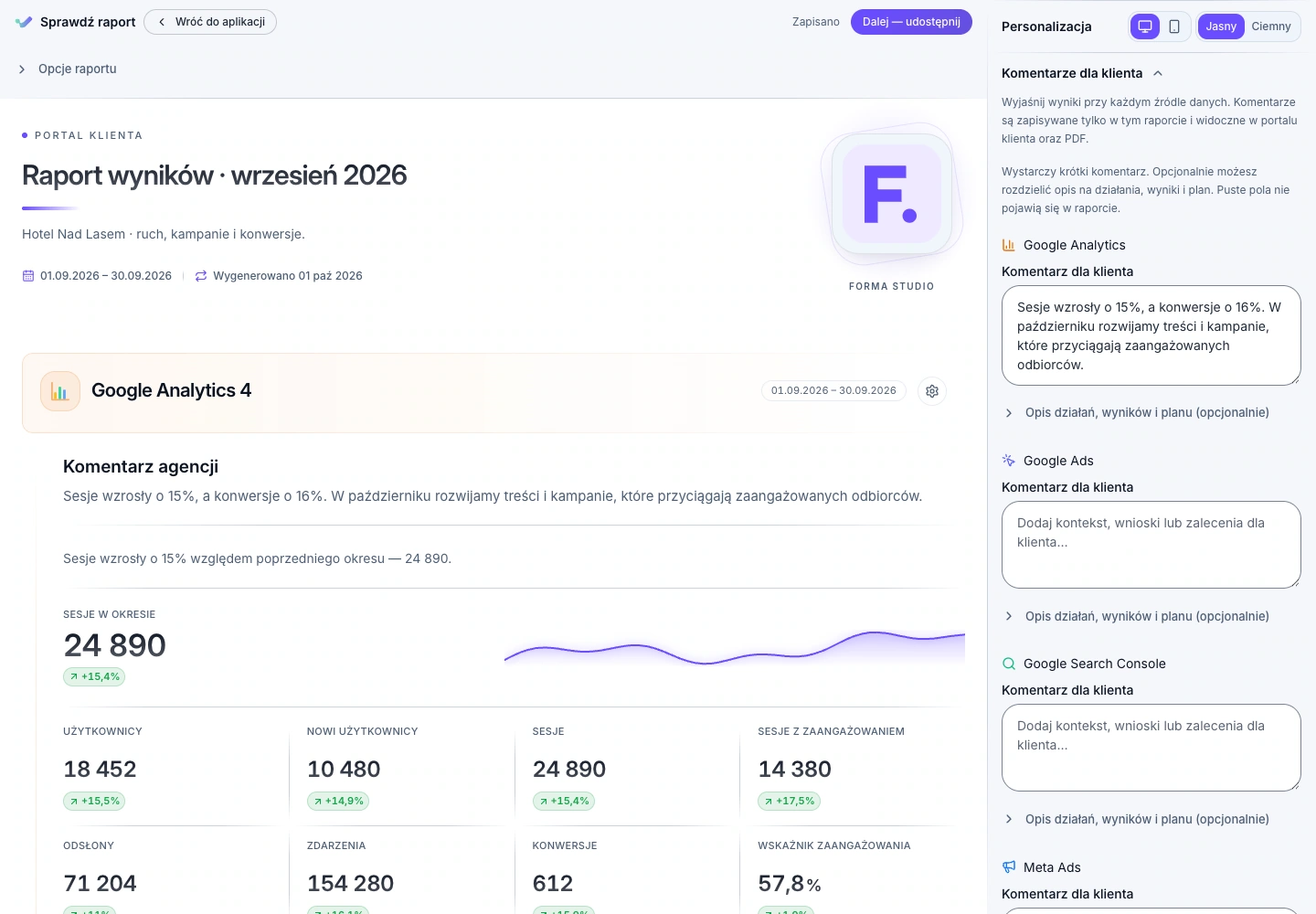
Data in ad platforms, commentary in a file, decisions in email. Visario brings structure to the journey from results to your client conversation.
In Visario, you connect sources to a client and prepare a report for the period you choose.
Add your agency's commentary and approved insights to the results.
The dashboard and statuses help you move from information to a specific action.
Who Visario is for
You get the most value from a recurring process: data, commentary, reporting, follow-up and billing. What matters is how you work, not just your job title.
Freelancers and small agencies
You're serving your first SEO or analytics clients. You want to collect data and present branded reports without assembling everything in separate files.
Explore StartSEO and performance agencies
You combine several sources per client and keep track of budgets and deadlines. You need schedules and invoices alongside results.
Explore GrowthAgencies building their own brand
Reporting is part of your service. You want your own portal domain, polished reports and branded emails.
Explore ProfessionalVisario organises reporting and client work. Campaigns are still configured in advertising platforms; decisions and interpretation remain your agency's responsibility.
From your first-report wizard to daily client work. See what you need at the start and what becomes useful later.
Real screens. One workflow.
A new account starts with a wizard: client, data sources, report. You don't have to learn every module at once. The panel shows trial limits and saves your progress.
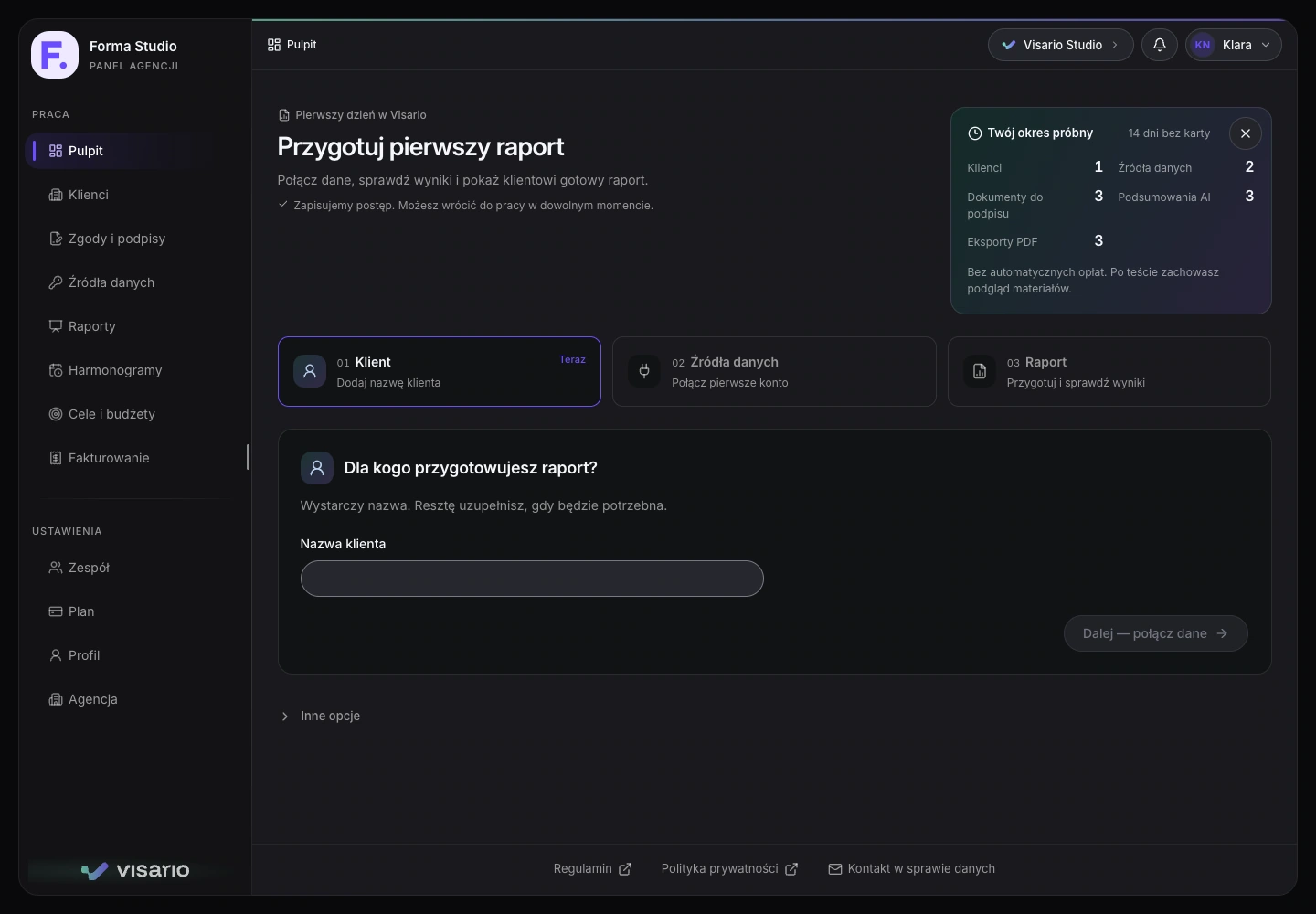
Once your first report is complete, you can switch to everyday agency work. Here we show a separate Professional demo account; multiple clients are not included in the 30-day trial.
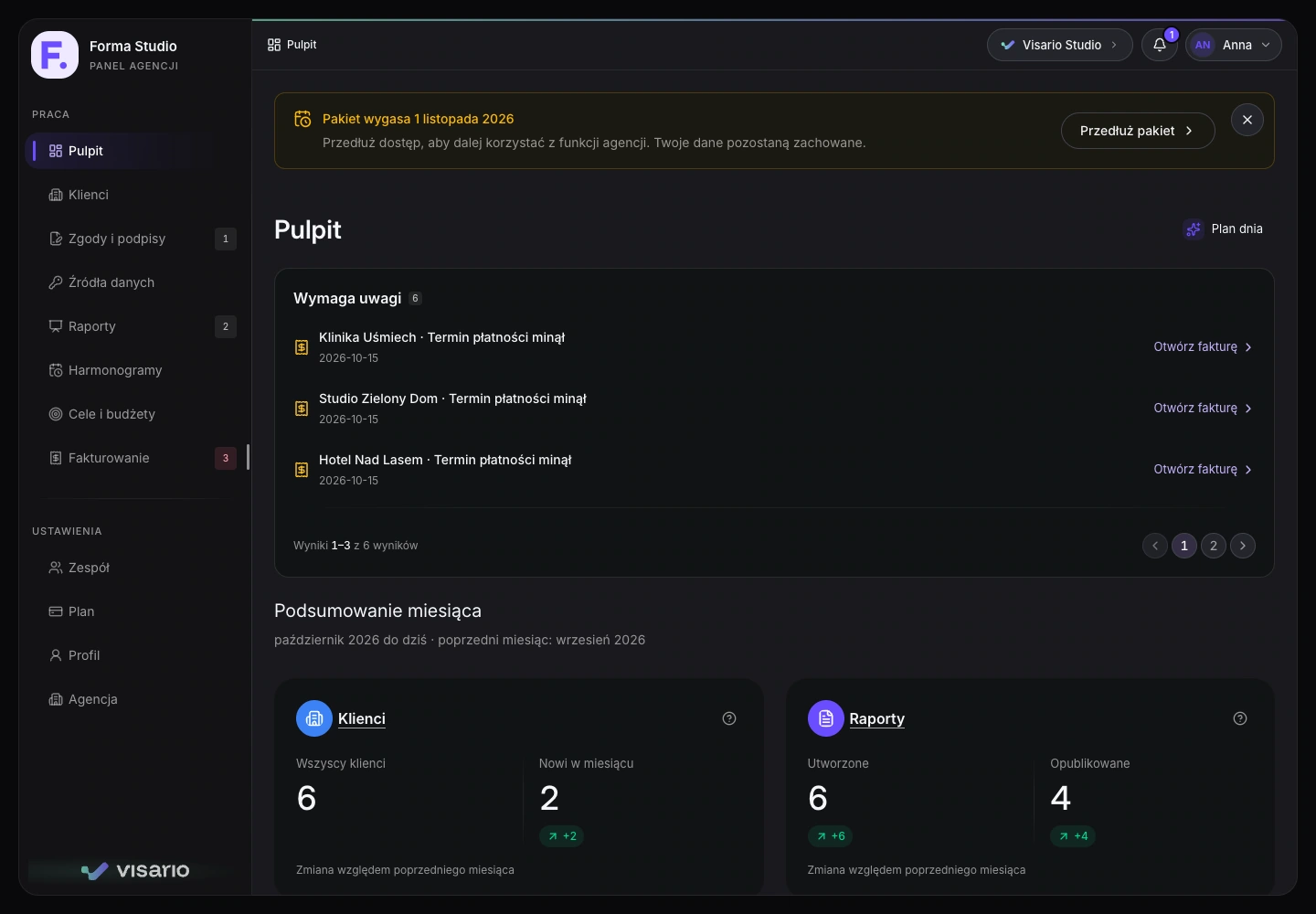
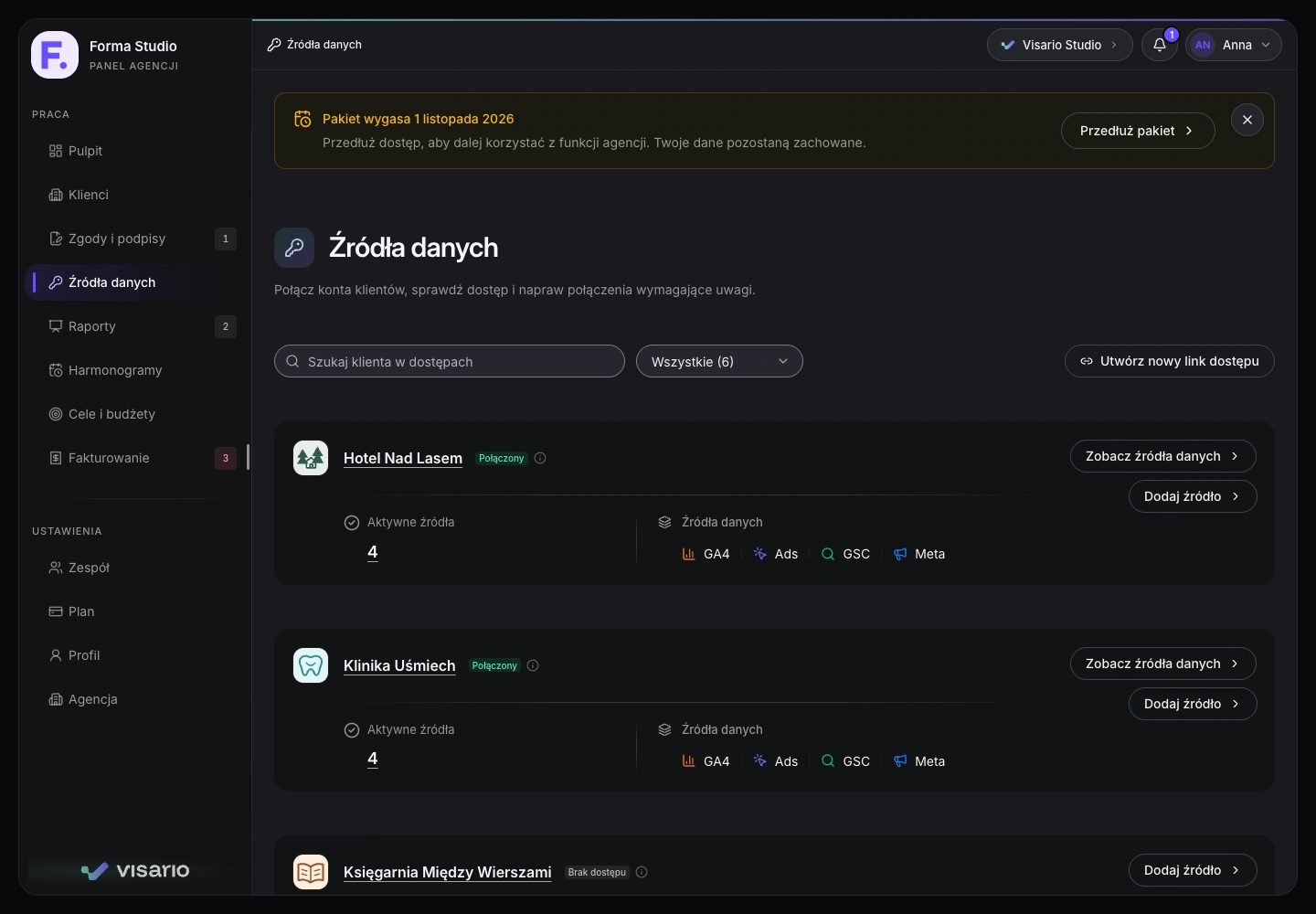
Check document and data-source statuses. Know which clients are ready for reporting.
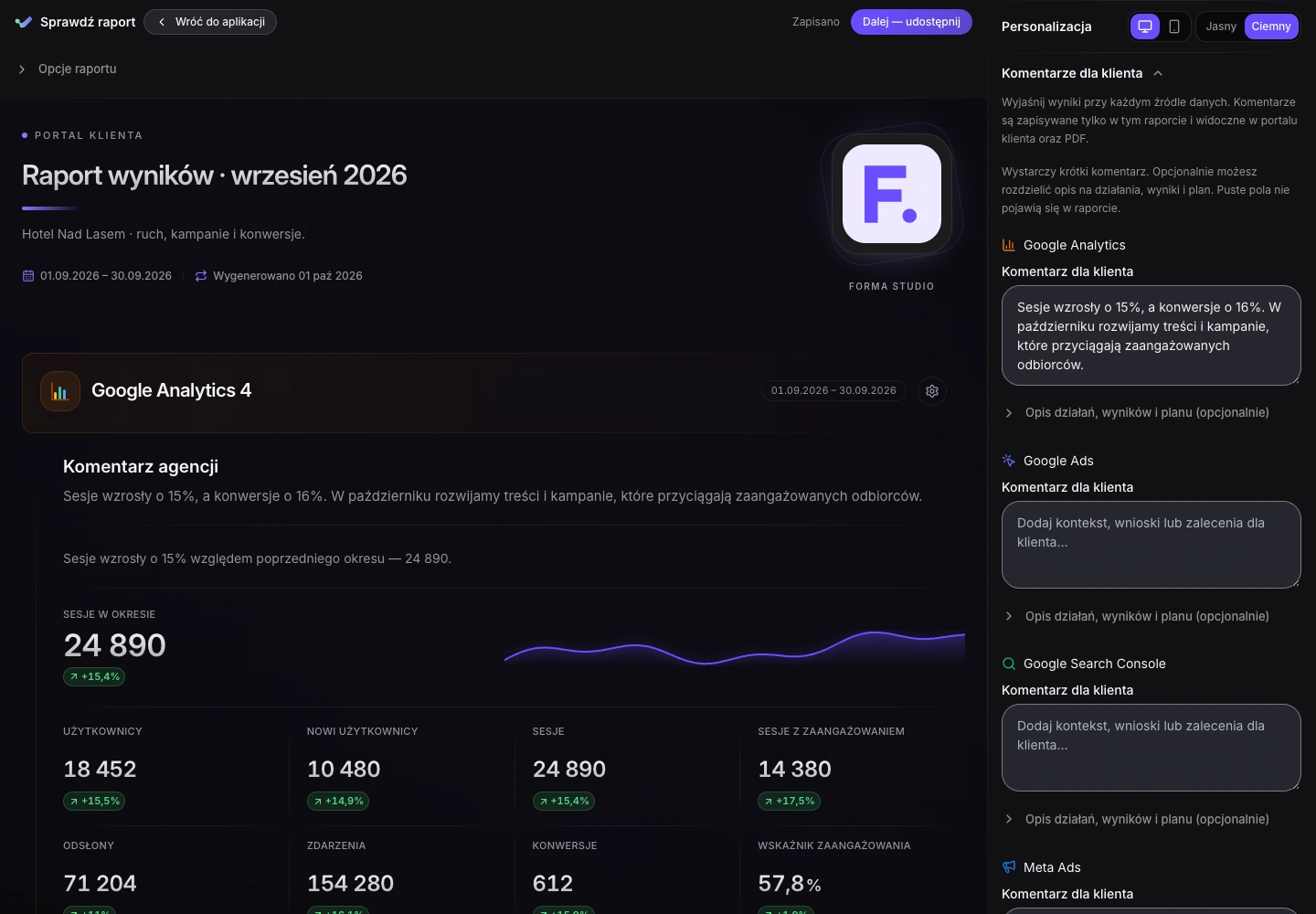
Match the report to your client's questions: choose useful metrics, add context and arrange the presentation in Studio.
Choose your KPIs when creating a report.
Put the most important information first.
Change block visibility, width and format.
Check campaign goals and keep invoices, amounts and payment dates close at hand.
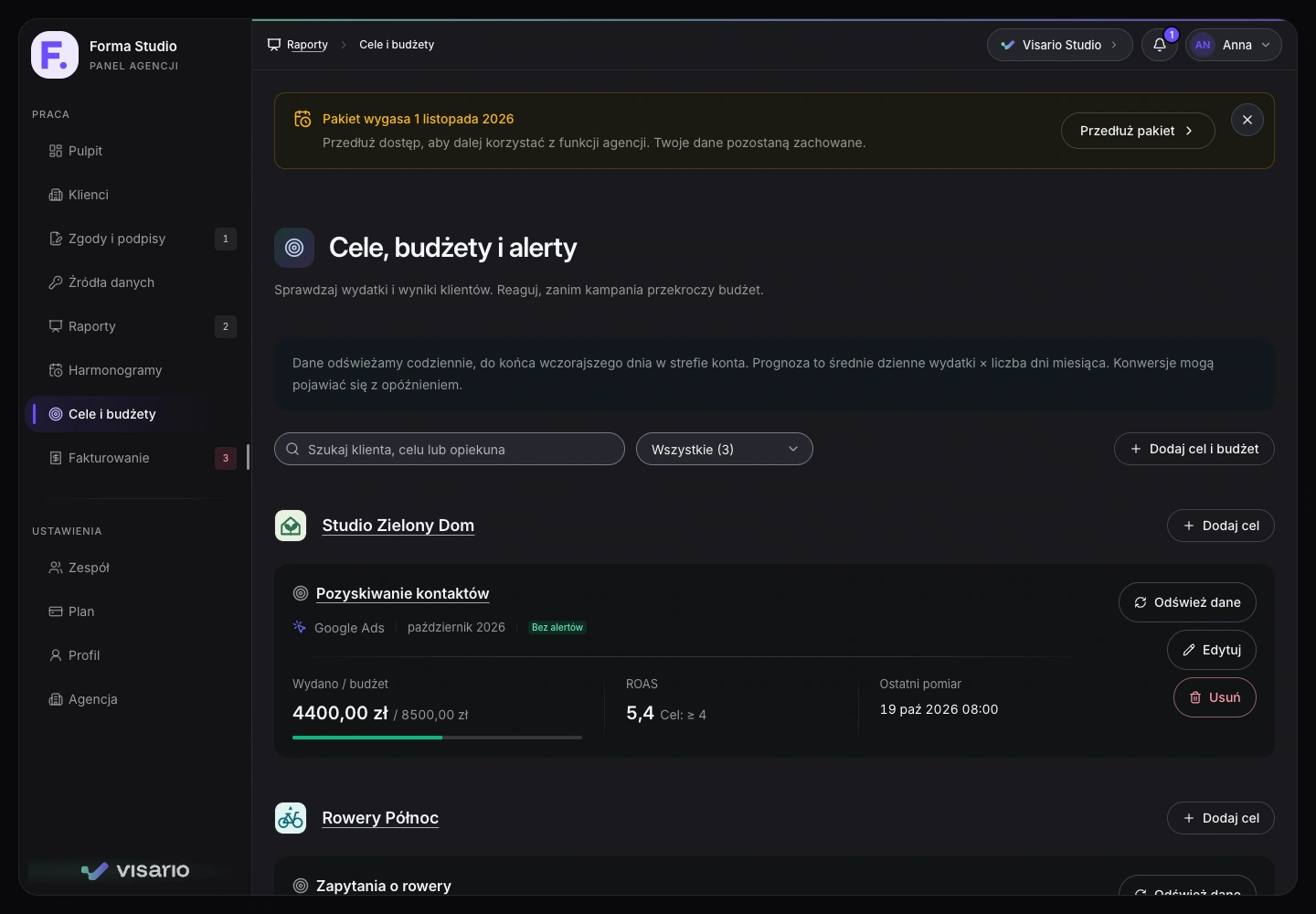
Actual app screens · Forma Studio · 28 October 2026 · Polish interface. Separate demo accounts for the standard trial and an established agency. Companies, results, connections and documents are fictional. Trial scope is explained beside each screen. Click to enlarge.
Data sources
First obtain your client's consent for the selected sources. Connect GA4, Search Console and Google Ads together with one Google account; other sources require separate authorisation.
Explore Visario's featuresSource availability depends on the plan and connected-account permissions.
Traffic and user behaviour
Search visibility and clicks
Campaign performance and ad spending
Facebook and Instagram ad performance
Profile reach and engagement
TikTok ad campaign performance
Microsoft network campaign performance and costs
Website visibility in Bing
See what you can do today and which plan includes it.
Bring together connected-source data for your chosen period. Add commentary and share the report in a client portal or export a PDF.
Included from Start
Select source metrics when creating a report. In Studio, drag blocks and sections, set visibility and width, and choose how to present them. Add your agency's logo and colours.
Branding from Start · custom domain from Professional
See clients, activity and items needing attention. Open a client's reports, documents and data-source status from their record.
Included from Start
Check client consent and connection statuses. Authorise GA4, Search Console and Google Ads together; connect other sources separately.
Data-source availability depends on the plan
Set the day of the month, time zone and sources. Prepare a report for review, or publish and send it automatically after separately enabling that mode and recording agency authorisation.
Included from Growth
Track budgets, conversions, CPA or ROAS for Google Ads and Meta Ads. Measurements and alerts help you respond; campaign changes are made in the advertising platform.
Included from Growth
Prepare a draft, issue an invoice and record payment. Track balances and due dates; once KSeF is configured, submit documents and monitor their status.
Included from Growth · KSeF requires setup
AI suggests insights from report metrics. Review them, add your team's knowledge and approve the client-facing version. Email drafts use approved content.
Requires an eligible active plan, enabled AI service and available quota
AI for agency work
Data is the starting point. Visario helps you draft insights, refine commentary and share it with clients — in a report, PDF and email under your agency's brand.
AI summaries · monthly allowance shared across the agency
Google Analytics · Period comparison
Traffic and conversions increased by 24%. The conversion rate remained at 1.5%.
Check which channels drove the increase before deciding to change the budget.
Review this insight in the context of the campaign.
A first version of your commentary, without starting from a blank page.
Sessions and conversions increased by 24%. This is a useful starting point for assessing last month's activity.
We launched a new service page during this period. We'll review its performance separately before attributing the conversion growth to it.
Compare acquisition channels and the new service page's performance.
Your saved draft stays private until approved.
Language and recommendations you can stand behind.
Sessions and conversions increased by 24%. We launched a new service page during this period. We'll review its performance separately before attributing the conversion growth to it.
We'll compare acquisition channels and the new service page's performance.
Consistent commentary in the client portal and downloaded PDF.
Hello,
here are the approved insights from your report. Sessions and conversions increased by 24%.
Next, we'll compare acquisition channels and the new service page's performance.
The Forma Studio team
Edit the subject and body. You decide when to send.
Summary, report links and agency branding in one email.
In manual mode, generating or saving a draft does not publish or send anything. Automatic scheduled delivery requires separate activation and agency authorisation.
Report commentary and an email with your agency's logo and colours create a consistent presentation.
The email draft uses approved content. You don't need to write it all again.
See how this workflow fits your agency.
AI is available on active paid plans when the service is enabled. The monthly agency-wide allowance is 25 summaries on Start, 100 on Growth and 300 on Professional. Editing and approving saved analysis does not use another summary.
The client sees the last approved version. Editing and saving a new draft does not change it until you approve again. You can also withdraw commentary from the portal and future PDFs; previously downloaded files remain with the recipient.
Selected aggregated report metrics and reporting-period and source context are sent to OpenAI. Client contact data is not sent for this analysis. Results are drafts for agency review; email drafting reuses approved text without another AI analysis.
Try Visario in the pilot first. Below are the features and monthly prices for continued use.
Explore the plans and leave your contact details. We'll get in touch about early access. Signing up is free and carries no obligation.
AI summaries are shared across the agency: Start 25, Growth 100, Professional 300 per month. See how AI works.
Value for your agency
Enter your assumptions, then compare them with actual report preparation time during the pilot.
The initial values are examples. The result estimates the value of time, not guaranteed savings or additional revenue. Allow for setup and report-review time too.
Your assumptions · per month
2.5 hours
Potential time freed up, worth PLN 250.
Start plan · up to 5 clients
Comparison by client count. Also consider your automation and team needs when choosing a plan.
Test your assumptions in the pilotA trial without surprises
On an empty account, the wizard guides you through client, data sources and report. One source is enough to prepare your first report and try the whole workflow.
Connections and valid access links reserving a slot count towards the limit. GA4 and Google Ads use two slots. Signing the document alone does not connect accounts; the client then grants access with the provider.
During the trial, the dashboard plan has a separate limit: one update per user per day. It does not use your 3 report AI summaries. The next update is scheduled from 05:00 Europe/Warsaw.
The standard trial includes 3 reports and, separately, 3 PDF exports for 30 days. A report is one client document for a given period; adding a source or updating that period does not use another report. Deleting a report does not restore the allowance. A PDF export uses quota only when the file is generated. Open the report in Studio, review it and decide whether to publish or export it.
No card and no automatic charges. After the trial, you retain a view of your materials and saved progress. New operations require a plan; your existing materials do not disappear.
This landing page collects pilot applications. Submitting the form does not create an account or start a trial: first confirm your email, then we'll agree on next steps.
Apply for the agency pilotBefore your first report
Clear scope and a clear next step. See how Visario fits your agency.
It connects data collection, reports with commentary and delivery to your client. All 8 standard integrations are available from Start. Plans differ in scale, automation, limits and branding. During the trial, you can see whether this workflow makes your agency's work easier.
Visario retrieves data and helps you report on it and monitor goals and budgets. Creating campaigns and changing bids or budgets still happens in Google Ads, Meta Ads and other advertising platforms.
A shared report with results, a layout refined in Studio and approved agency commentary, accessible through a link. An invitation to sign consent and connect accounts shows two clear steps under one link: signing, then authorisation. A signature alone does not grant account access.
Leave your email in the early-access form. A phone number is optional. We'll send a thank-you email with a confirmation link. Once confirmed, we'll discuss your workflow and eligibility. Selected new agencies receive a 30-day trial with setup support. Signing up is free, creates no account or paid subscription and does not provide immediate app access.
The standard 30-day trial for new agencies includes 1 client, 2 data-source slots, 3 reports, 3 documents for signature, 3 PDF exports and 3 report AI summaries for the whole period. The 30-day pilot is granted individually to qualified new agencies: 3 clients, 8 source slots, 10 documents for signature, 10 PDFs and 10 report AI summaries. Neither requires a card or automatically becomes a paid subscription.
During the trial it has a separate limit: one plan update per user per day. It does not use your report-summary allowance: 3 in the standard trial and 10 in the pilot. Generation depends on AI-service availability. Updates are scheduled from 05:00 Europe/Warsaw; a new account may receive its first update on the next scheduled run.
Source slots include connections and valid access links reserving a slot. GA4 and Google Ads use two slots, even when authorised with a single Google sign-in. A document for signature is a separate item; signing or resending it does not create another document. Consent scope does not replace a source connection.
We don't charge automatically or require a card for the trial. Afterwards, you retain a view of your materials and saved progress. Choose a plan to perform new operations. The standard trial includes 3 reports and, separately, 3 PDF exports for all 30 days. A report counts once per client and reporting period; updating it or adding a source for the same period does not use another report. Deleting a report does not restore the allowance.
You decide whether to purchase a plan. With the 50% discount, monthly prices are Start PLN 74.50, Growth PLN 174.50 and Professional PLN 299.50 for the first 12 months from your first confirmed payment. Regular monthly prices of PLN 149, PLN 349 and PLN 599 then apply. The trial does not start the discount period. Changing plans or pausing use does not restart the offer.
GA4, Search Console and Google Ads can share a Google authorisation. You need permission to access the selected services. Other sources require separate authorisations. Visario does not disable security measures required by the account provider.
In manual mode, AI creates a draft for review. Only approved content appears in the client-facing report. Automatic scheduled publication and delivery require separate activation and agency authorisation. AI depends on an eligible active trial or plan, service configuration and available quota.
Your logo, name and colours are included from Start. Growth allows reports without the Visario logo. Professional adds your own portal domain and email branding. Emails are sent through an authenticated Visario mailbox, using your agency's sender name and reply-to address.
Tell us how many clients you serve, which data sources you use and how you currently prepare reports. That helps us assess whether Visario fits your workflow. You can also join the early-access list; we'll get in touch to agree on next steps.
Tell us about your client count, data sources and what makes reporting difficult today.
Selected new agencies can join a free 30-day pilot without a payment card. We'll discuss the scope and onboarding date, help connect your data and create a report. We'll ask you to complete a real task and discuss your experience. Applying does not grant access automatically.
Enter your email. You can optionally add a phone number.
You'll find the link in our thank-you email.
We'll discuss your agency's needs and, if you qualify, agree on the pilot dates.
Apply for the agency pilot. Access is granted after a conversation.
Check your inbox and spam folder. Open the link in the email to confirm your address. Once confirmed, we'll contact you by email, or by phone if you provided a number.
Signing up does not create an account or subscription. Pilot access is granted individually after a conversation; applying is free.
The data controller is Mateusz Jach (Visario). Privacy policy